Tailwind color palettes the fast way!
1 min read
- showdev
- tailwindcss
- vscode
- css

You have one brand color and you need the full Tailwind palette, from 50 to 950. No need to ask the AI for it, one shortcut in your editor does it.
When I start a new project, the first thing I do is set up the theme colors. Lately it's tempting to just ask the AI: "give me a Tailwind palette from #db4d53". Then you wait for it to think, you spend tokens, and you get shades that are guessed. Sometimes your own color isn't even in there.
So I made Tailwind CSS Shades, a small VS Code extension that does it instantly. No AI, no tokens, no waiting.
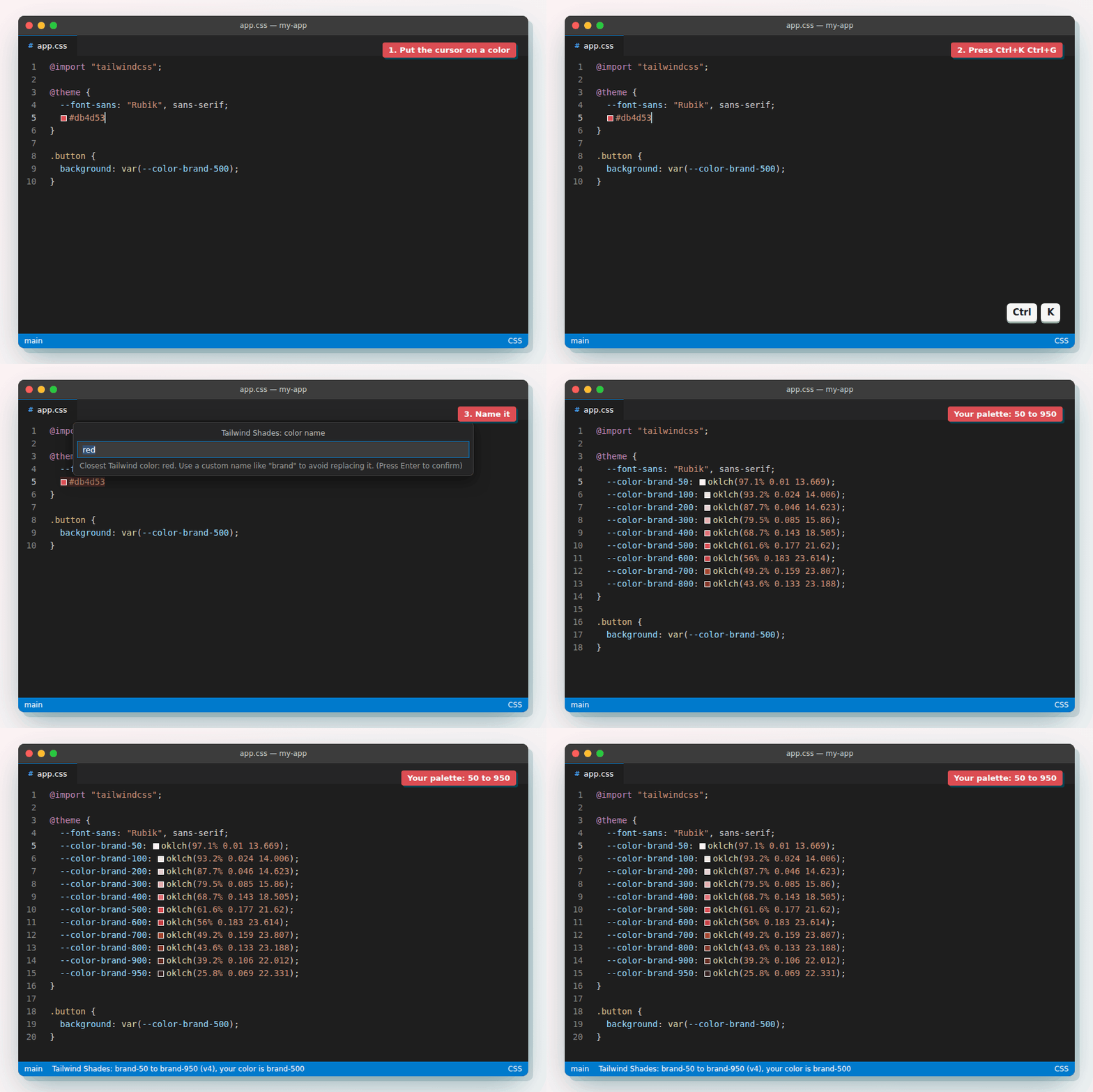
How to use it
- Put the cursor on a color:
#db4d53,rgb(…),hsl(…),oklch(…)or a color name. - Press
Ctrl+K Ctrl+G(Cmd+K Cmd+Gon macOS). - Name it, like
brand.
And you get your theme:
@theme {
  --color-brand-50: oklch(97.1% 0.012 16.784);
  --color-brand-100: oklch(91.4% 0.03 17.121);
  /* ... */
  --color-brand-900: oklch(38.1% 0.131 25.127);
  --color-brand-950: oklch(25.8% 0.085 25.446);
}
It reads your Tailwind version from the project, so on v3 you get a tailwind.config.js object with hex colors instead. It works with v4, v3, v2 and v1.
The shades look like Tailwind's
It doesn't just mix your color with white and black. It finds the closest Tailwind color to yours and copies how that color changes from light to dark, in OKLCH. And your color stays exactly as it is, at the shade where it fits best.
Get it
- VS Code Marketplace
- Open VSX for Cursor, Windsurf and VSCodium
- Source on GitHub
If it saves you some time, a rating on the Marketplace or Open VSX helps other people find it.